CopyFleet
HomeFeaturesPricingFAQBlogOpen the app

MT5 copy trading · open for sign-up

Trade once.
Every MT5 account follows.

MT5 copy trading for your own accounts. Copy from one Master to many Followers—across brokers, each with its own lot size and rules. Bring your team in without sharing passwords. CopyFleet runs the terminals.

Create your accountSee inside CopyFleet

MT5 only · $10 per account / month · free history import
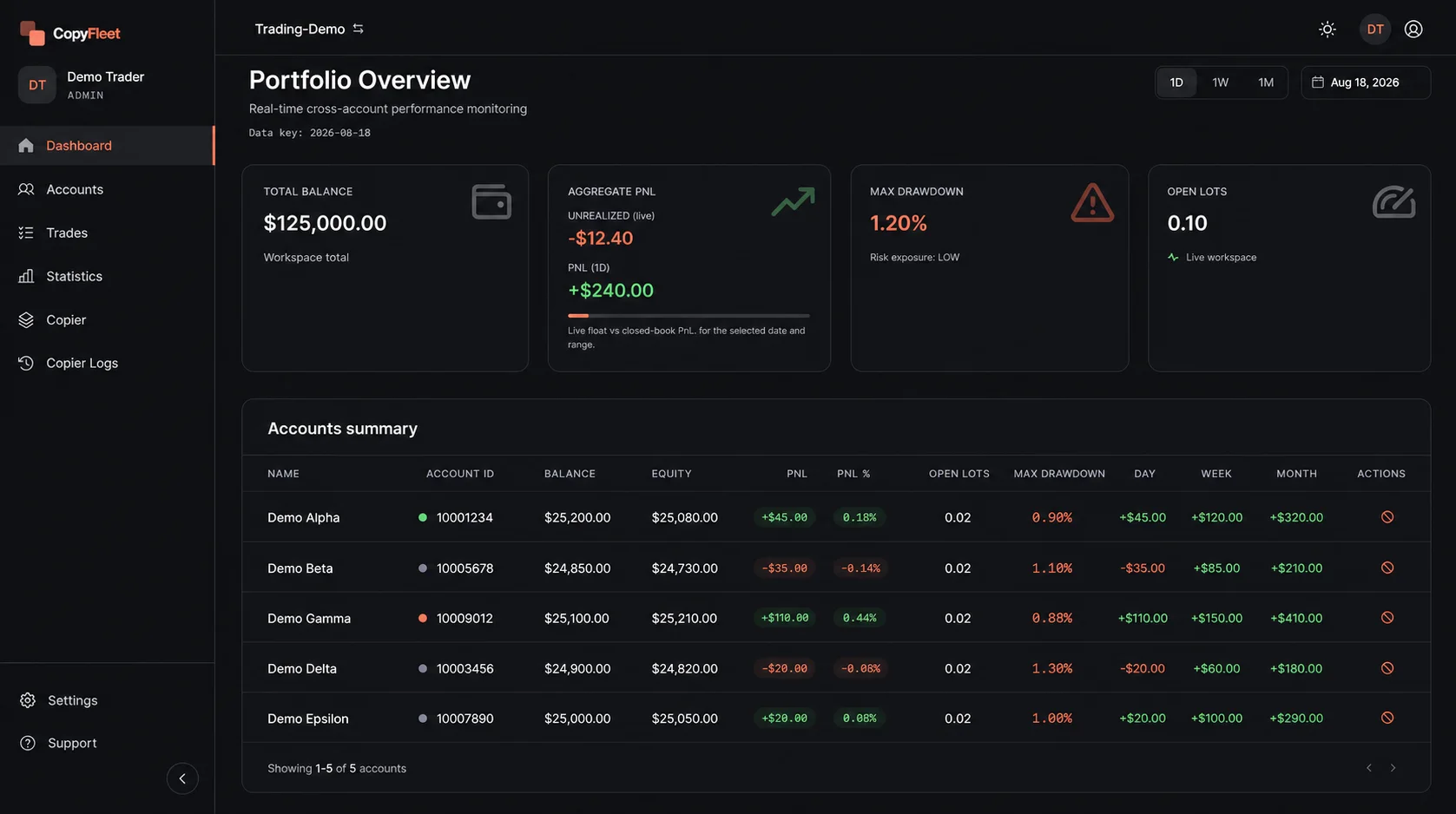
Portfolio overview · real product, demo dataLive view
CopyFleet Portfolio Overview showing total balance, PnL, drawdown, and every MT5 account in one table, with demo data.
Built for MT5One platform, done properly.
Cross-brokerSymbol names matched for you.
Team rolesAdmin, Trader, Viewer.
Managed terminalsNo VPS to rent or babysit.

Why traders switch

Your strategy works. Running it on every account shouldn’t be a second job.

If you trade more than one MT5 account, you already know the routine. Here’s what changes.

TaskTodayWith CopyFleet
Placing tradesRepeat each trade by hand in every terminal.Open it once on the Master. Every Follower copies it.
Symbol namesXAUUSD on one broker, XAUUSD.s or XAUUSDc on the next.Matched automatically when you add a Follower. Edit any pair by hand.
Lot sizeThe same lot on a small account and a large one.Lot Multiplier, Fixed Lot, or Equity Ratio—set per Follower.
Your teamYour MT5 password, shared with an assistant.Invite them as Trader or Viewer. Your password stays yours.
InfrastructureRent a VPS, install MT5, keep Windows updated.Terminals run 24/7 on managed VPS and log back in after a restart.
Missed tradesGuess why a Follower didn’t copy.Copier Logs show every step on every Follower.

Inside CopyFleet

The real product, one screen at a time.

In the order you’ll use it: connect accounts, set up copying, check every copy, review results, bring in your team. Real screens, demo data.

Add an MT5 account in seconds.

Login, password, broker server. CopyFleet assigns a managed terminal and keeps it running.
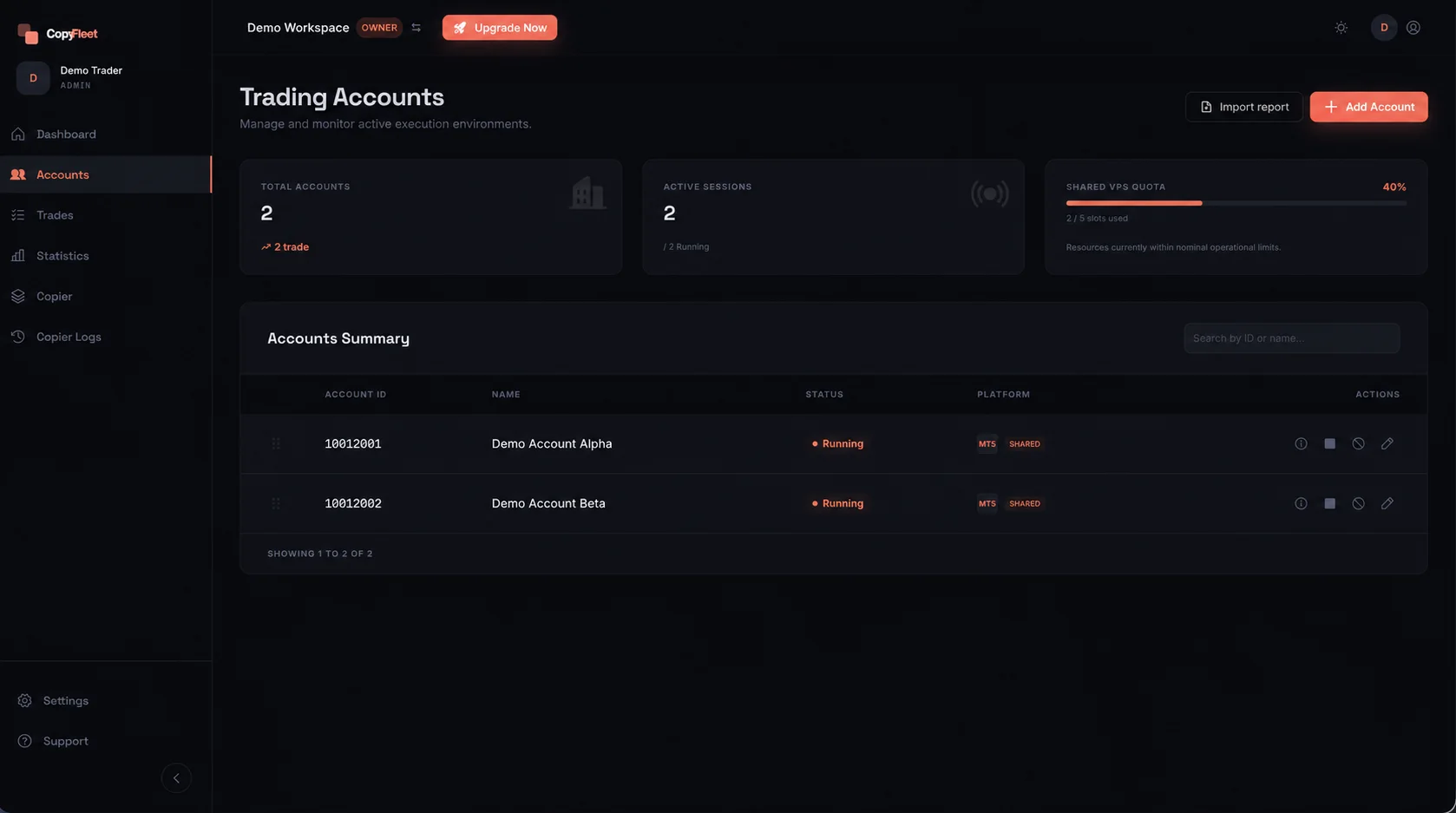
  • Clear status: connected, recovering, failed—with the reason
  • Close All open positions in one click
  • Slot indicator shows paid accounts in use
Account details
Trading accountsDemo data
CopyFleet Account Management listing demo MT5 accounts with connection status.

One Master. Every Follower on its own terms.

Pick a Master, add Followers, and decide how each one copies. Symbol names are matched for you.
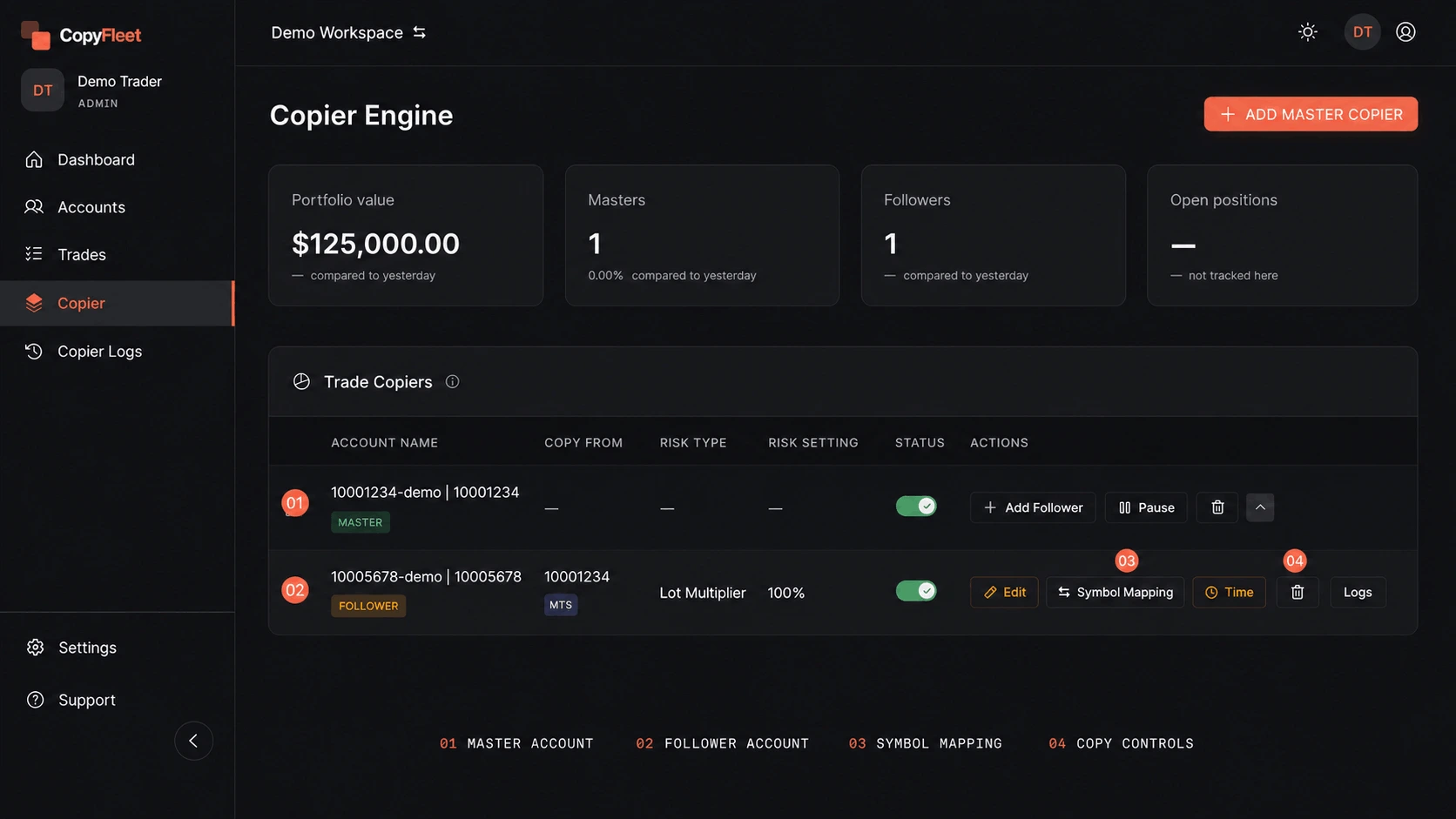
  • Lot Multiplier, Fixed Lot, or Equity Ratio per Follower
  • Auto symbol mapping—XAUUSD to XAUUSD.s or XAUUSDc
  • Filters, trading hours, trade delay, pause
Copier details
Copier EngineDemo data
CopyFleet Copier Engine with a Master and Follower, symbol mapping, and copy settings.

Every copy, step by step.

Each Master trade becomes a journey: how the lot was sized, when it opened, when it closed—on every Follower.

  • Copied and failed journeys marked at a glance
  • Filter by Master, Follower, ticket, or date
  • Copy-failed alerts in the app and by email
Copier Logs details
Copier Logs · JourneyFrom a real log · IDs changed
Master #4807731150XAUUSDBUY0.01Live 1COPIED
08:03:30.512PENDING_OPENfollower Live 2CREATEDBUY0.01 × balance 5.397 × 1 = 0.05397 → 0.05@ 4151.385
08:03:30.913PENDING_OPENfollower Live 2SUCCEEDEDBUYvol 0.05@ 4151.385
08:30:56.906CLOSEfollower Live 2CREATEDBUY@ 4153.677
08:30:57.460CLOSEfollower Live 2SUCCEEDEDBUYvol 0.05@ 4153.676
Master #4812093370XAUUSDSELL0.01Live 1FAILED
11:42:46.000BROKER_CANCELEDfollower Live 2SELLORDER_CANCELEDvol 0.05

See how every account is doing.

The Portfolio shows the whole workspace at a glance (you saw it above). Statistics shows what produced the result.
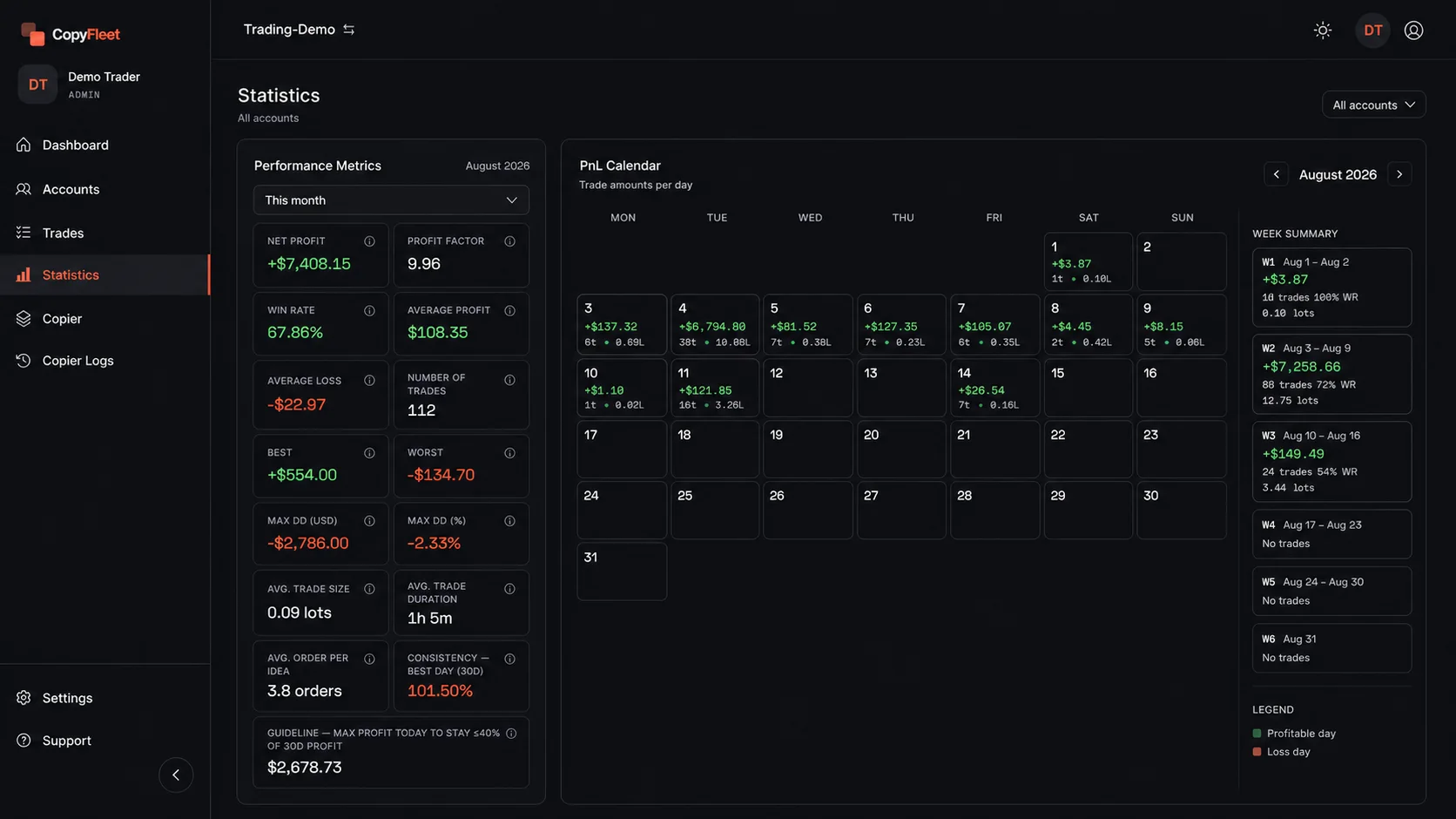
  • Profit factor, win rate, drawdown, PnL by symbol
  • Daily PnL calendar and take-profit / stop-loss hits
  • Import MT5 history free on the Free plan
Results details
StatisticsDemo data
CopyFleet Statistics with performance metrics and a daily PnL calendar using demo data.

Share access, not passwords.

Invite a partner, assistant, or accountant by email or link. Each workspace has its own team.
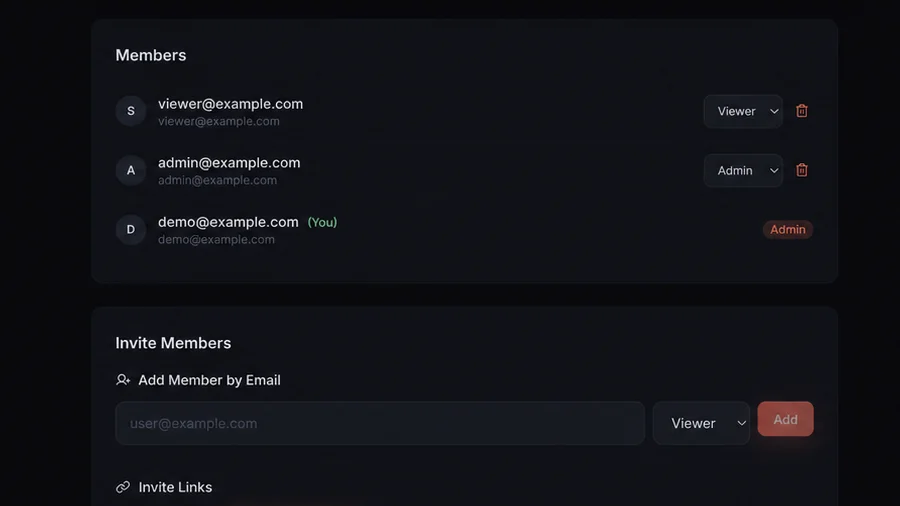
  • Admin: full control, including billing
  • Trader: account commands, no setting changes
  • Viewer: read-only, performance and logs
Team details
MembersDemo data
CopyFleet team members view with roles and invitation controls using demo data.

Lot sizing

Same trade. Each Follower sizes it its own way.

The Master opens 1.00 lot. Here’s what three Followers could open, depending on the mode you pick for each.

Mode 01

Lot Multiplier

Scale the Master’s lot up or down.

1.00 lot × 22.00 lot
Mode 02

Fixed Lot

Always the same lot, whatever the Master trades.

fixed at 0.100.10 lot
Mode 03

Equity Ratio

Follower equity relative to the Master’s. A smaller account copies smaller.

1.00 × ($5,000 ÷ $10,000)0.50 lot

Worked examples. Min/max limits and each broker’s volume rules apply. The app shows a plain-language preview before you save.

Pricing

Pay per live account. Analyze history for free.

No sales call. Sign up, create a workspace, and choose how many accounts it needs.

Free
$0

For reviewing your trading history.

  • Import MT5 history reports (.xlsx)
  • Statistics, PnL, and drawdown
  • No limit on imported accounts
  • No live sync or copier
Start free
Paid
$10per MT5 account / month

2-account minimum · billed by calendar month.

  • Everything in Free
  • Live MT5 sync and dashboard
  • Copier and Copier Logs
  • Managed VPS, workspaces, and team roles
Calculate your monthly cost

The copy-trading market forgot about experienced traders. Here’s why we built CopyFleet.

Read the founder story
GuidesHow to copy trades across multiple MT5 accountsCopyFleet vs Local Trade CopierCopy trading vs trade copier: what's the difference

Run your strategy on every account.

Create a workspace, connect your MT5 accounts, and set up your first Master and Follower.

Get started with CopyFleet

MetaTrader 5 only · supported brokers · email sign-up

CopyFleet
HomeFeaturesPricingFAQBlogPrivacyTermsContact

© 2026 CopyFleet

Built for traders, by traders.